The Grand Tour
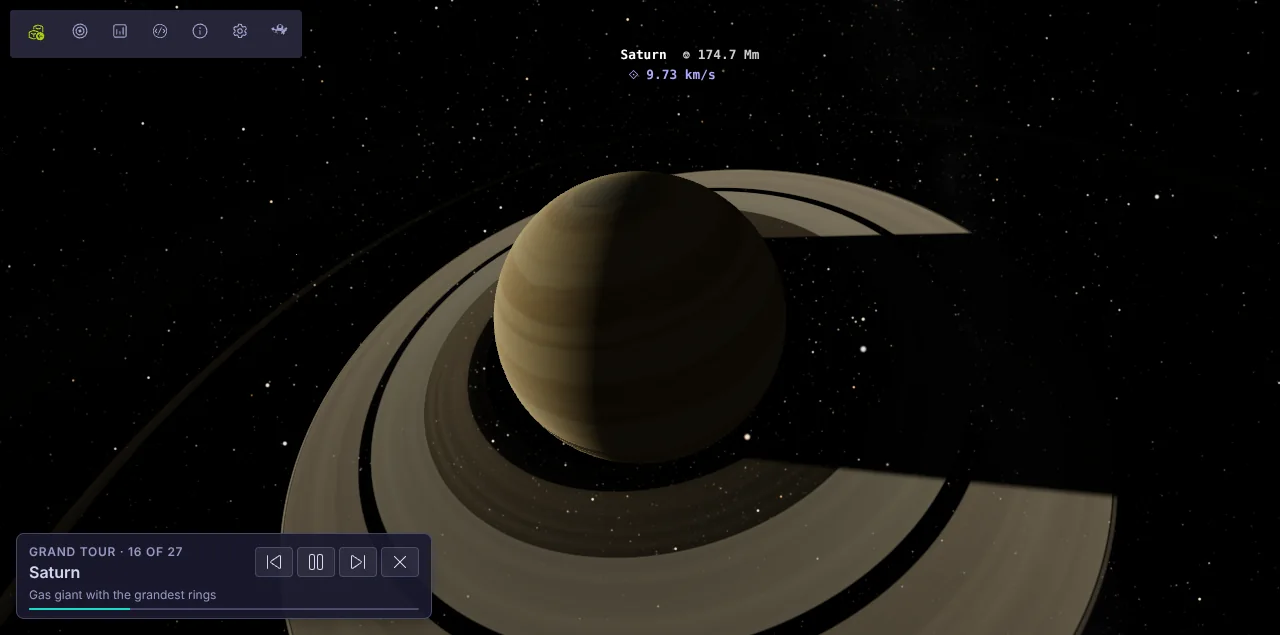
The Grand Tour flies the camera between the most interesting bodies in the current system, lingers at each one while slowly orbiting it, and shows a card naming the stop with a short note about it.
Start a tour
Section titled “Start a tour”- Load a system.
- Open the Celestial Hierarchy panel from the engine toolbar.
- Press Tour.
On a phone the hierarchy panel closes when the tour starts, so you can see the view and the tour card.
Controls
Section titled “Controls”The card in the bottom left corner shows where you are (for example 16 of 27) and a progress bar for the current stop. Its buttons go to the previous stop, pause or resume, go to the next stop, and end the tour.
Dragging the camera pauses the tour so you can look around. Press play to carry on.
While the tour runs, orbit lines, prediction lines and AU markers are hidden and only the current body is labelled. Everything is restored when the tour ends.
Where it goes
Section titled “Where it goes”- Sol follows a curated route from the Sun through Earth, the ISS and the Moon, out past the giant planets to the comets, with a note at every stop.
- Generated systems are walked from the stars outwards: up to 24 stops taking in the planets, up to two asteroid belts, notable moons (lava worlds, volcanoes, oceans, ice, rings, atmospheres and the largest) and up to two comets.